Video encoding
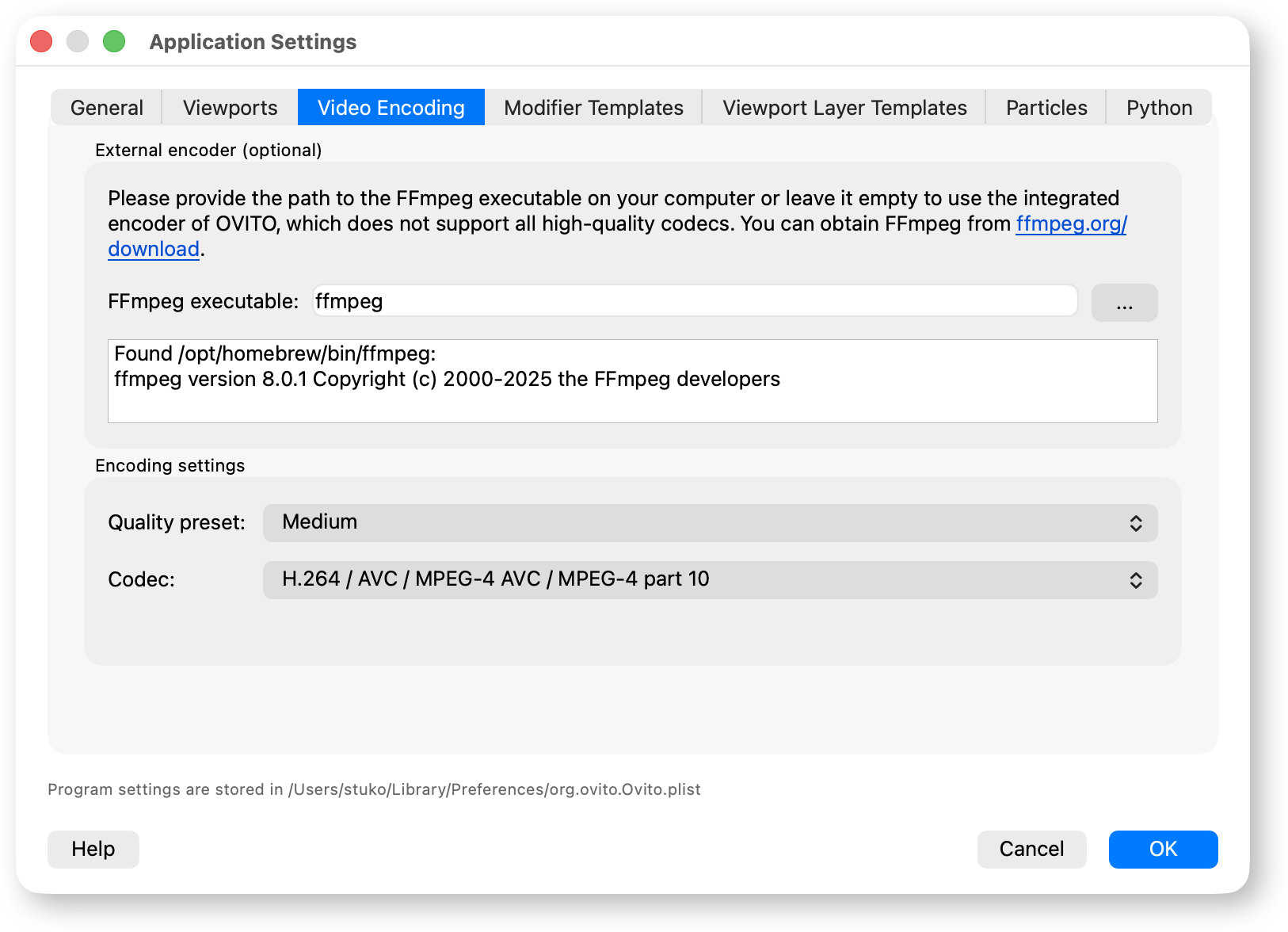
On this tab of the application settings dialog you can configure an external FFmpeg executable used for video encoding. This is optional — OVITO comes packaged with an integrated FFmpeg-based video encoding engine that will automatically be used for video encoding if no external FFmpeg executable is configured.
However, the integrated encoder of OVITO cannot produce videos using the high-quality H.264 and H.265 codecs due to licensing and patent restrictions. By specifying an external FFmpeg executable you can let OVITO produce video files using these better video encoding codecs, leading to smaller file sizes and improved quality.
The FFmpeg software can be downloaded from the official website at https://ffmpeg.org/download.html.
External encoder
- FFmpeg executable
Here you can provide the path to an FFmpeg executable installed on your computer. You can either type in a full filesystem path to the executable or, if FFmpeg is in your
PATH, just the name of the executable (“ffmpeg”), see the screenshot. Click the … button to select the FFmpeg executable using a file selection dialog. The executable must be named eitherffmpegorffmpeg.exe(case insensitive).Once you specify the FFmpeg executable, OVITO will examine it first. If the selected executable is invalid, OVITO will fall back to the internal FFmpeg encoder. The outcome of the validation is displayed in the status field.
You can clear the path to use the internal video encoder of OVITO again.
Encoding settings
- Quality preset
A higher quality preset gives increased visual fidelity of the resulting video but also leads to a larger file size.
When using an external FFmpeg, the selected preset determines the
crfparameter on the command line interface. For H.264, thecrfvalue ranges from 26 (low quality) to 19 (high quality). For H.265, thecrfvalue ranges from 24 (low quality) to 17 (high quality). The built-in encoder of OVITO (MPEG-4 codec) chooses theq_minandq_maxencoder parameters depending on the selected quality preset, ranging from 3 (high quality) to 8 (low quality). Previous versions of OVITO always used the high quality preset for the MPEG-4 codec.- Codec
Select the video encoding algorithm (codec). OVITO checks the provided FFmpeg executable for supported codecs. Currently, H.264, H.265, and MPEG-4 codecs are supported by OVITO. The H.264 codec offers widespread compatibility and good performance. The more modern H.265 (HEVC) codec is supported by newer players and can be used to further reduce file sizes at visually comparable quality. The MPEG-4 codec should only be used for playback on legacy devices that do not support newer codecs.
The H.265 codec does not work with
.aviand.movcontainer file formats. OVITO will automatically fall back to the H.264 codec in these cases.