PDB file reader
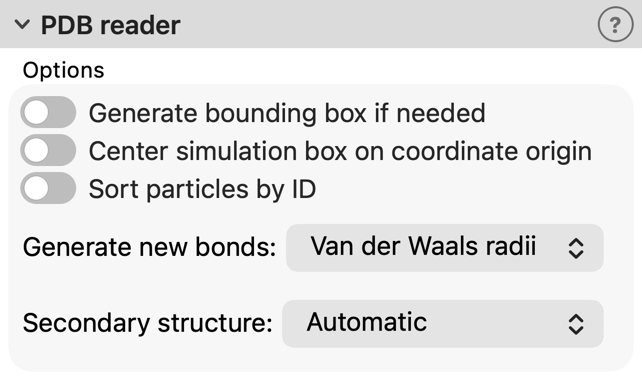
User interface of the PDB file reader, which appears as part of a pipeline’s file source.
For loading model structures stored in the RCSB Protein Data Bank (PDB) format. OVITO can directly load gzipped PDB files (“.gz” suffix).
The unit cell defined by the CRYST1 record is converted to a periodic simulation cell.
Note that the atomic coordinates stay as they are and are not wrapped into the unit cell. Use the
Wrap at periodic boundaries modifier to wrap the atoms into the cell. The cartoon representation follows the atoms.
Options
- Generate bounding box if needed
If this option is enabled and no simulation cell is found in the PDB file (no
CRYST1record), OVITO will generate an axis-aligned bounding box containing all atoms. This bounding box has open boundary conditions and can be used as an approximate simulation cell in subsequent calculations.- Center simulation cell on coordinate origin
If enabled, OVITO shifts the geometric center of the simulation cell to the origin of the coordinate system, including all atoms. Otherwise, the simulation cell is positioned such that its corner is located at the coordinate origin.
- Sort particles by ID
If enabled, OVITO reorders the imported atoms by their numeric identifiers (atom serial numbers from the PDB file) after loading.
- Generate new bonds
Lets OVITO create ad-hoc bonds between the atoms based on their interatomic distances. If this option is set to Off, OVITO reads the pair-wise connections from the
CONECTrecords of the PDB file instead, if present. Any other setting replaces the bonds from the file with the generated ones. Three bond criteria are available, which correspond to the modes of the Create bonds modifier:- Van der Waals radii
Two atoms are connected if their distance is smaller than 0.6 times the sum of their van der Waals radii. No bonds are created between two hydrogen atoms.
- Covalent radii
Bonds are created based on the covalent radii and the maximum coordination numbers of the chemical elements.
- VESTA-like
Bonds are created according to the built-in table of element-pair bond distances adopted from the VESTA program.
Alternatively, you can apply the Create bonds modifier to the system after import, which provides more control over the generation of bonds.
- Secondary structure
The reader creates a cartoon representation of the protein backbone if the structure contains amino-acid residues. This option controls where the secondary structure (helices and strands) is taken from:
- Automatic (default)
The secondary structure is taken from the
HELIXandSHEETrecords of the file. For chains that are not covered by any of these records, it is computed from the atomic coordinates using the DSSP algorithm (Kabsch & Sander, 1983). This handles files lacking these records as well as files in which only some of the chains are annotated.- From file
Only the
HELIXandSHEETrecords of the file are used. Chains without records are rendered as coil.- DSSP
The secondary structure of all chains is computed with the DSSP algorithm, ignoring the records of the file.
Python parameters
The file reader accepts the following optional keyword parameters in a call to the import_file() or load() Python functions.
- import_file(location, sort_particles=False, bounding_box=False, centering=False, generate_bonds='vdw', secondary_structure='auto')
- Parameters:
sort_particles (bool) – Makes the file reader reorder the loaded atoms before passing them to the pipeline. Sorting is based on the atom serial numbers loaded from the PDB file.
bounding_box (bool) – Generate an ad-hoc simulation cell as bounding box around the imported atoms.
centering (bool) – Translate atom coordinates and simulation box to center them at the coordinate origin.
generate_bonds (str) – Controls the generation of interatomic bonds during the file import process. The bond criterion can be based on the van der Waals radii of the chemical elements (
'vdw'), on their covalent radii and maximum coordination numbers ('covalent'), or on the built-in table of element-pair bond distances adopted from the VESTA program ('vesta').'off'disables bond generation, in which case bonds are loaded from theCONECTrecords of the input file if present. These criteria correspond to the modes of theCreateBondsModifier, which you can alternatively apply to the system after import for more control over the generation of bonds.secondary_structure (str) – Controls where the secondary structure assignment of the protein residues is taken from:
'auto'uses theHELIX/SHEETrecords of the file and computes the secondary structure with the DSSP algorithm only for chains lacking such records;'file'uses only the records of the file;'dssp'computes the secondary structure of all chains from the atomic coordinates.
Changed in version 3.17.0: The generate_bonds parameter now selects the bond criterion. True is still accepted as an alias for 'vdw'.