XYZ file reader
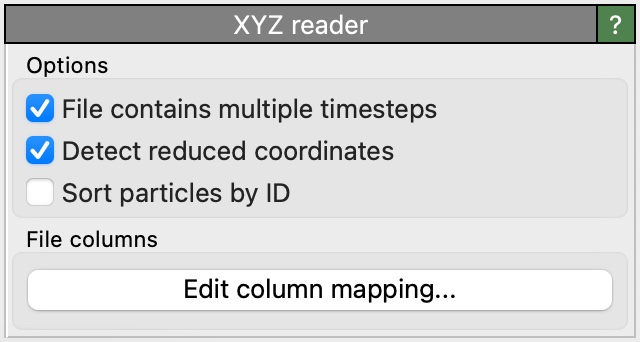
User interface of the XYZ reader, which appears as part of a pipeline’s file source.
XYZ is a simple text-based file format for storing particles or atoms and their properties.
Basic XYZ format
In its simplest form, an XYZ file consists of a short header (two lines) followed by the list of atoms:
8
Cubic bulk silicon cell
Si        0.00000000      0.00000000      0.00000000
Si        1.36000000      1.36000000      1.36000000
Si        2.72000000      2.72000000      0.00000000
Si        4.08000000      4.08000000      1.36000000
Si        2.72000000      0.00000000      2.72000000
Si        4.08000000      1.36000000      4.08000000
Si        0.00000000      2.72000000      2.72000000
Si        1.36000000      4.08000000      4.08000000
The first line specifies the number of atoms and the second line is used to store an arbitrary comment text (may be an empty line). Each of the following atom lines consist of the species name and the atom’s Cartesian xyz coordinates.
This reader is able to load gzipped XYZ files (“.gz” suffix) and zstd compressed files (“.zst” suffix).
XYZ files may store simulation trajectories. Multiple frames are simply stored back-to-back in one file, i.e., the next two-line header directly follows after the atoms list of the preceding frame. OVITO automatically detects if the loaded XYZ file contains more than one frame.
Simulation cell and boundary conditions
Since the basic XYZ file format doesn’t contain any information about a simulation cell or boundary conditions, OVITO assumes that the XYZ file describes a non-periodic system.
The file reader option Generate bounding box if needed can be enabled to instruct OVITO to create a tight simulation cell by computing the axis-aligned bounding box of the loaded particle coordinates during import.
This ad-hoc cell is useful for visualizing the atomic positions in a non-periodic system, but it is not suitable for periodic systems, since the generated bounding box will not match the original simulation cell geometry of the simulation. In such cases, the extended XYZ file format should be used instead for data exchange with OVITO, because it stores the true simulation cell geometry and periodic boundary conditions.
XYZ files with additional columns
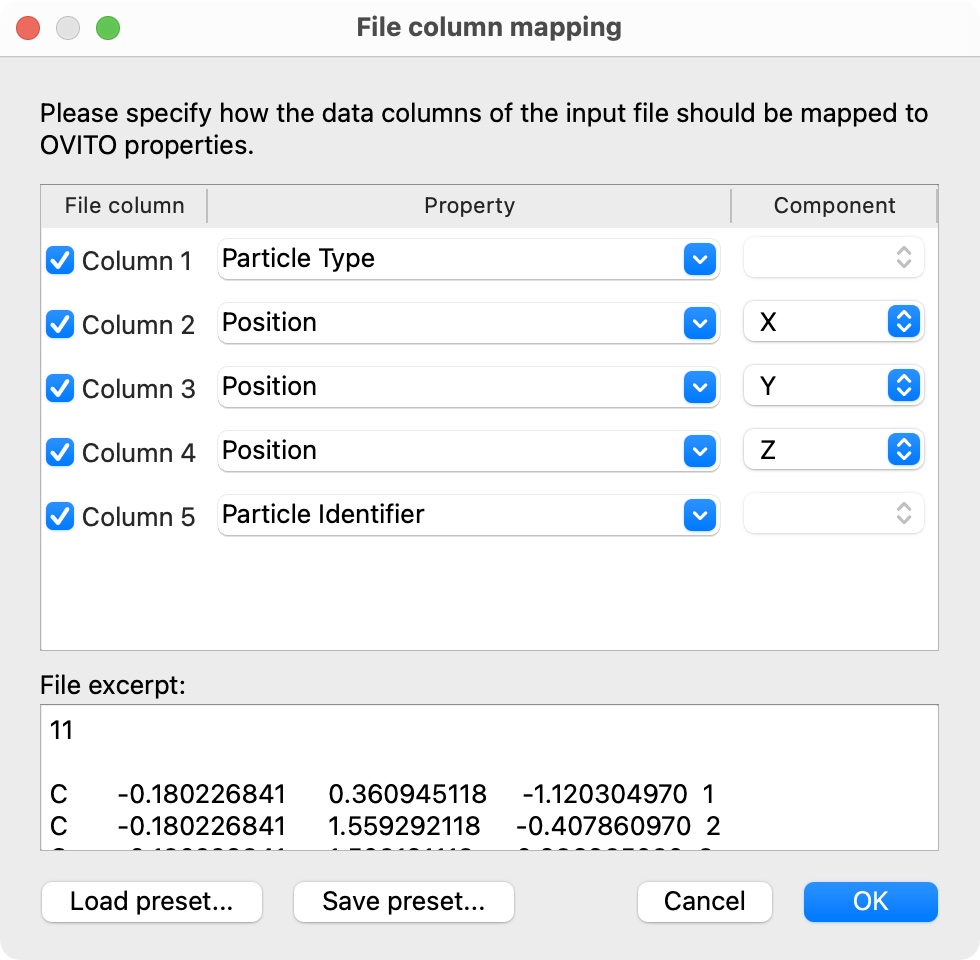
While the basic XYZ format consists of exactly four data columns as described above, OVITO is prepared to read XYZ files with an arbitrary number of columns containing auxiliary per-atom attributes. The file reader will display the following dialog window to let you specify the mapping of each file column to a corresponding particle property within OVITO.
OVITO normally adopts the original order of the atoms as they are listed in the XYZ file.
However, if a file column contains unique atom IDs, and they are mapped to OVITO’s Particle Identifier
property, the file reader provides a user option to sort atoms by ID during import
(sort_particles keyword parameter in Python, see below).
Extended XYZ format
The extended XYZ format is an enhanced version of the basic XYZ format, allowing extra columns to be present in the file for additional per-atom properties as well as standardizing the format of the comment line to include the simulation cell geometry, boundary conditions, and other per-frame parameters. Here is an example:
8
Lattice="5.44 0.0 0.0 0.0 5.44 0.0 0.0 0.0 5.44" Properties=species:S:1:pos:R:3 Time=0.0
Si        0.00000000      0.00000000      0.00000000
Si        1.36000000      1.36000000      1.36000000
Si        2.72000000      2.72000000      0.00000000
Si        4.08000000      4.08000000      1.36000000
Si        2.72000000      0.00000000      2.72000000
Si        4.08000000      1.36000000      4.08000000
Si        0.00000000      2.72000000      2.72000000
Si        1.36000000      4.08000000      4.08000000
In the extended XYZ format, the comment line is replaced by a series of key=value pairs.
The keys should be strings, and values can be integers, reals, logical values (T, True, F, False, etc.), strings, or arrays.
Strings must be enclosed in double quotes if they contain whitespace or any of the characters =",[]{}\.
Within a quoted string, a double quote or backslash character must be escaped with a backslash (\" and \\).
One-dimensional arrays are written in the form [1, 2, 3], two-dimensional arrays in the form [[1, 2], [3, 4]].
For backward compatibility, the legacy array form "1 2 3" (a quoted list of whitespace-separated numbers or logical values) is supported too.
The key/value pairs Lattice and Properties are required in an extended XYZ file.
Other parameters - e.g. Time in the example above - can be added to the parameter line as needed
and will be imported by OVITO as global attributes. Array values become attributes
whose values are lists (tuples in Python), and logical values become Boolean attributes.
If the comment line does not conform to the extended XYZ syntax, OVITO falls back to a more lenient interpretation
of the line, which extracts the Lattice, Properties, and pbc values but does not interpret all other parameters reliably.
Lattice is a Cartesian 3x3 matrix representation of the simulation cell vectors,
with each vector stored as a column and the 9 values listed in Fortran column-major order,
i.e. in the form:
Lattice="<ax> <ay> <az> <bx> <by> <bz> <cx> <cy> <cz>"
where \((a_x\ a_y\ a_z)\) are the Cartesian x-, y- and z-components of the first simulation cell vector \(\mathbf{a}\),
\((b_x\ b_y\ b_z)\) those of the second simulation cell vector \(\mathbf{b}\), and \((c_x\ c_y\ c_z)\) those of the third simulation cell vector \(\mathbf{c}\).
Equivalently, the Lattice matrix may be written as a two-dimensional array, with each cell vector forming one column of the matrix:
Lattice=[[<ax>, <bx>, <cx>], [<ay>, <by>, <cy>], [<az>, <bz>, <cz>]]
Note
The extended XYZ specification is ambiguous regarding this two-dimensional form of the Lattice value:
its text states that the rows of the matrix are the cell vectors, whereas the reference implementation
(libAtoms/extxyz) and the ASE library treat
the columns as the cell vectors. OVITO follows the reference implementation. To avoid any ambiguity,
OVITO’s XYZ file writer always uses the 9-value form of the Lattice key.
An orthogonal cell may be specified by three values, Lattice="<ax> <by> <cz>", which form the diagonal of the cell matrix.
Optionally, the Cartesian coordinates of the simulation cell origin \(\mathbf{o} = (o_x\ o_y\ o_z)\) can be specified as follows:
Origin="<ox> <oy> <oz>"
Without this field, OVITO places the cell origin at the standard position (0,0,0).
The periodic boundary conditions in each cell direction may be specified as triplet of Boolean flags (F/T or 0/1), e.g.:
pbc="T T F"
or, equivalently, pbc=[T, T, F].
If the pbc keyword is not present, OVITO assumes the simulation cell to be periodic in all three directions
(only if it’s an extended XYZ file including the Lattice keyword!).
The list of data columns in the file is described by the Properties parameter, which should take the form of a series of
colon-separated triplets giving the name, format (S for string, R for real, I for integer, L for logical) and number of columns of each property.
For example:
Properties="species:S:1:pos:R:3:vel:R:3:flagged:I:1"
indicates that the first file column represents atomic species, the next three columns represent atomic positions, the next three velocities, and the last is a single integer called flagged. With this columns definition, the line
Si 4.08000000 4.08000000 1.36000000 0.00000000 0.00000000 0.00000000 1
would describe a silicon atom at position \((4.08, 4.08, 1.36)\) with zero velocity and the flagged particle property set to 1.
Logical columns (data format L) are imported as integer properties with values 0 and 1.
Text columns (data format S) are imported as typed properties if they map to one of OVITO’s
typed properties (e.g. species, molecule_type, or structure_type), or as user-defined properties with data type string otherwise.
Note that the per-atom values of a text column may not contain whitespace.
The file reader automatically maps file columns to the right particle properties in OVITO if their name matches one of the following standard names (case-insensitive):
XYZ column specification |
OVITO particle property |
|---|---|
|
|
|
|
|
|
|
|
|
|
|
|
|
|
|
|
|
|
|
|
|
|
|
|
|
|
|
|
|
|
|
|
|
|
|
|
|
|
|
|
|
|
|
|
|
|
|
|
|
|
|
|
|
|
|
|
|
|
|
|
|
|
|
|
|
|
|
|
|
|
|
|
|
|
|
|
|
|
|
|
|
|
File columns having any other name will be mapped to a new user-defined particle property of the same name.
Changed in version 3.17.0: OVITO now supports the extended XYZ specification maintained at https://github.com/libAtoms/extxyz, including whitespace around the equal sign, escape sequences in quoted strings, array values, and text columns of arbitrary name, which are imported as particle properties with data type string.
OpenBabel exyz format
OVITO supports also the .exyz format written by OpenBabel,
which contains a comment line starting with the token %PBC.
In this variant of the XYZ format, the simulation cell geometry follows behind the atoms list as a separate section.
Bond generation
The XYZ format does not store any bond topology. The file reader option Generate bonds lets OVITO automatically create bonds connecting the imported atoms. Three bond criteria are available, which correspond to the modes of the Create bonds modifier:
- Van der Waals radii
Two atoms are connected if their distance is smaller than 0.6 times the sum of their van der Waals radii. No bonds are created between two hydrogen atoms.
- Covalent radii
Bonds are created based on the covalent radii and the maximum coordination numbers of the chemical elements.
- VESTA-like
Bonds are created according to the built-in table of element-pair bond distances adopted from the VESTA program.
Alternatively, you can apply the Create bonds modifier to the system after import, which provides more control over the generation of bonds.
Note that bonds can only be generated if the imported particle types are chemical elements known to OVITO,
i.e. if the type column of the XYZ file contains element names such as Si or H
(species:S:1 or element:S:1 in an extended XYZ file).
For files listing numeric type ids instead, no bonds are created.
Python parameters
The XYZ file reader accepts the following optional keyword parameters in a call to the import_file() or load() Python functions.
- import_file(location, columns=None, bounding_box=False, rescale_reduced_coords=False, sort_particles=False, generate_bonds='off')
- Parameters:
columns (list[str | None] | None) – A list of OVITO particle property names, one for each data column in the xyz file. Overrides the mapping that otherwise gets set up automatically as described above. List entries may be set to
Noneto skip individual file columns during parsing.bounding_box (bool) – If set to
Trueand the imported XYZ file does not contain a simulation cell definition, the file reader will generate an ad-hocSimulationCellby computing the axis-aligned bounding box of the loaded particle coordinates.rescale_reduced_coords (bool) – If set to
True, and if the XYZ file contains the dimensions of the simulation cell, and if all atomic coordinates are either in the range \([0,1]\) or the range \([-0.5,+0.5]\), the file reader will convert the reduced coordinates to Cartesian coordinates.sort_particles (bool) – Makes the file reader reorder the loaded particles before passing them to the pipeline. Sorting is based on the values of the
Particle Identifierproperty loaded from the xyz file, if any.generate_bonds (str) – Controls the generation of bonds connecting the atoms loaded from the file. The bond criterion can be based on the van der Waals radii of the chemical elements (
'vdw'), on their covalent radii and maximum coordination numbers ('covalent'), or on the built-in table of element-pair bond distances adopted from the VESTA program ('vesta').'off'disables bond generation. These criteria correspond to the modes of theCreateBondsModifier, which you can alternatively apply to the system after import for more control over the generation of bonds.
Changed in version 3.17.0: The generate_bonds parameter now selects the bond criterion. True is still accepted as an alias for 'vdw'.
Added in version 3.16.1: The generate_bonds option is now supported by the XYZ file reader.
Changed in version 3.10.0: New default value rescale_reduced_coords=False.
Changed in version 3.14.0: New default value bounding_box=False.