Surface mesh
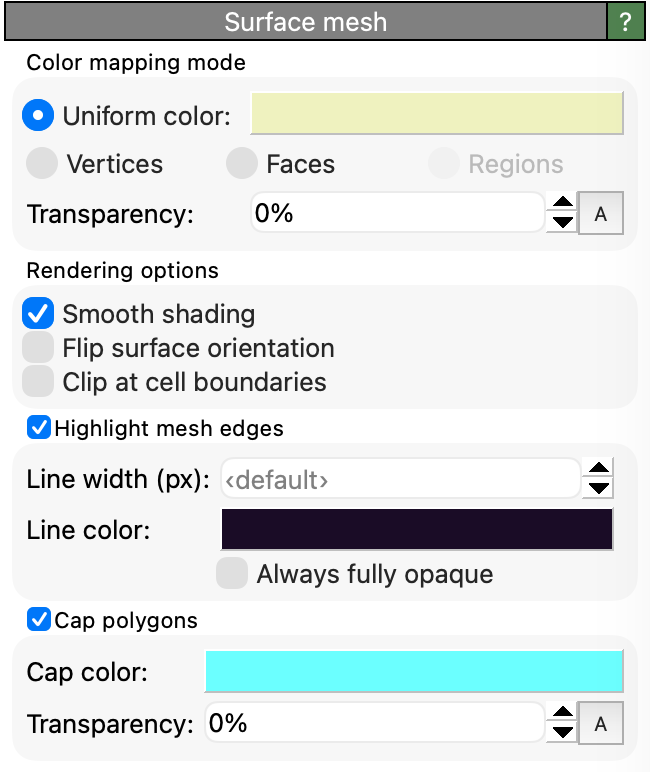
This visual element controls the appearance of triangulated surface meshes, which are produced by the Construct surface mesh, Create isosurface, Dislocation analysis (DXA) or other modifiers in OVITO.

Surface meshes are typically closed, two-dimensional manifolds embedded in a simulation cell. If periodic boundary conditions are employed, the surface mesh itself can be periodic. For visualization purposes, such a periodic mesh is first converted to a non-periodic representation by truncating it at the simulation cell boundaries. OVITO has an option to render so-called Cap polygons to fill the holes that would otherwise appear at the simulation cell boundaries where the surface is clipped.
Color mapping mode
Unless the surface already has explicit color information associated with it, you have the choice between a simple uniform coloring mode and a pseudo-coloring mode, which lets you visualize some local property associated with the vertices, faces or regions of the mesh.
Parameters
- Transparency
The degree of transparency of the surface.
- Smooth shading
Turns on interpolation of face normals to make the polygonal mesh appear smooth, not faceted.
- Flip surface orientation
Reverses the orientation sense of the surface and generates cap polygons on the outside, not inside of the enclosed volume.
- Clip at cell boundaries
If the surface extends beyond the boundaries of a non-periodic simulation cell, this option limits the display to those sections of the surface mesh that are located inside the simulation box. Note that this option does not apply to simulation cells with periodic boundary conditions. Along periodic directions, the behavior is governed by the Wrap at periodic boundaries option below.
- Wrap at periodic boundaries
Controls whether the mesh is split at the periodic boundaries of the simulation cell and wrapped back into the primary cell image for rendering. Turn this option off to render mesh parts crossing a periodic boundary as they are, i.e. protruding from the cell.
This matters for meshes whose individual regions are meant to be seen as a whole. The coordination polyhedra generated by the Coordination polyhedra modifier, for example, are constructed as complete convex hulls around their central atom, with the neighbor positions unwrapped across periodic boundaries; wrapping them again for rendering would cut them in half. The modifier therefore turns this option off by default.
Mesh regions anchored to particles, i.e. the coordination polyhedra, the ring polygons generated by the Find rings modifier, and the Voronoi cells generated by the Voronoi analysis modifier, follow the virtual periodic images of their particles when that option of the Particles visual element is enabled. Each such region is then drawn as one rigid body wherever its anchor particle is drawn, and this option has no effect on it.
Caution
Turning off this option only makes sense for meshes stored in unwrapped coordinates. For a contiguous periodic mesh whose vertices are stored wrapped into the primary cell, e.g. the Voronoi cells or the ring polygons, faces crossing a periodic boundary would be drawn spanning the entire cell. Use the virtual periodic images of the particles instead to show such regions in one piece.
- Highlight mesh edges
Activates the rendering of wireframe lines along the visible edges of the mesh facets.
- Line width (px)
The width of the wireframe lines in device-independent pixels. The default value (zero) lets the rendering system choose the line width automatically.
- Line color
The color used for rendering the wireframe lines.
- Always fully opaque
When enabled, the wireframe lines are always rendered fully opaque, regardless of the surface transparency setting. When disabled, the wireframe lines adopt the same transparency as the surface.
- Cap polygons
This option enables the display of caps where the surface manifold intersects with the simulation cell’s boundaries. It is only available for surface meshes that are closed, i.e., which represent a two-dimensional manifold that divides space into “interior” and “exterior” regions.
See also
ovito.vis.SurfaceMeshVis (Python API)