Bonds
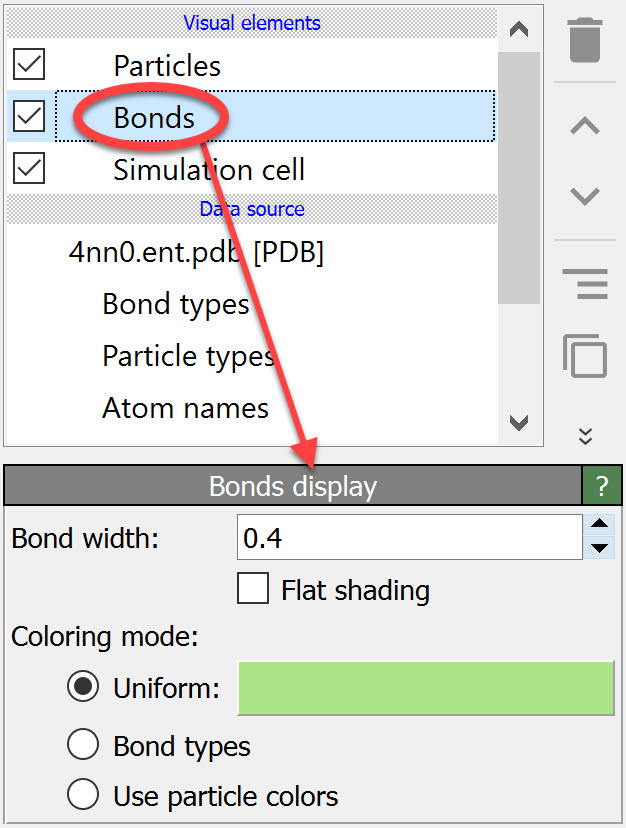
This visual element controls how bonds between pairs of particles are rendered as cylindrical connections.
Bonds are either loaded from the simulation file as part of the model, or they can be created within OVITO by the Create bonds modifier. Alternatively, the Voronoi analysis modifier can generate bonds between nearest neighbor particles.
Parameters
Appearance
These settings control the geometric representation of bonds:
- Bond width
Controls the uniform display diameter of bond cylinders (default: 0.4 simulation length units). This value is used for all bonds unless overridden by the per-bond
Widthproperty. The width is specified in simulation units of length. For bonds with aBond Ordergreater than 1, the individual cylinders are automatically rendered slightly thinner to avoid excessive visual overlap.- Flat shading
When enabled, bonds are rendered with flat shading to create the look of thick lines connecting particles. When disabled (default), bonds use smooth shading for a more realistic cylindrical appearance.
Coloring
The color of bonds is determined through a priority hierarchy. The coloring mode selector controls which method is used when explicit per-bond colors are not present:
- By bond type
Colors bonds according to their
Bond Typeproperty value. Each bond type can have a unique color assigned through the Edit types modifier.- By particle
Bonds adopt colors from the particles they connect. Each bond is rendered as two half-cylinders, with each half colored according to its connected particle.
- Uniform color
All bonds are rendered using the same color specified by the color selector (default: gray).
All these options are disabled when the Color per-bond property is defined, which always takes precedence.
Note
To set explicit colors for individual bonds, use the Compute property
or Color coding modifiers to set the Color bond property.
Once this property exists, it takes precedence over all coloring mode options.
Visualize bond order property
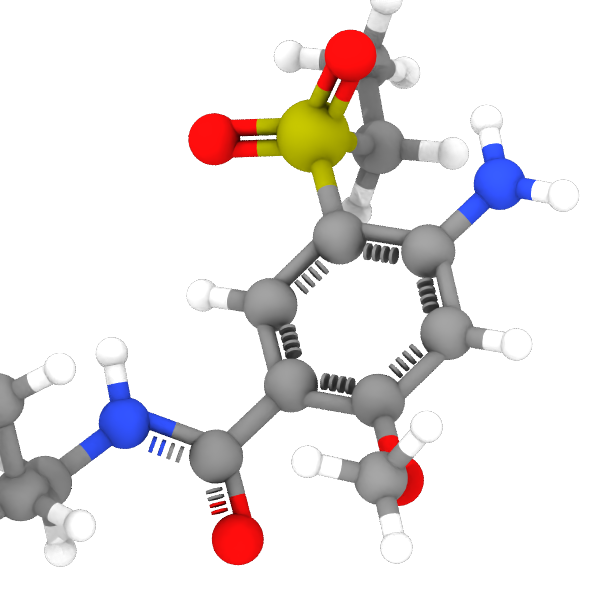
Aromatic ring found by the Bond order modifier
The options in this section are only enabled if the bonds have been assigned the Bond Order property.
This property is commonly generated by the Bond order modifier, which analyzes the local bonding environment to assign bond orders based on chemical rules.
It is also imported directly from file formats that carry explicit bond type information, such as Tripos MOL2 (where ar/am bonds become 1.5, 2 bonds become 2.0, etc.) or ReaxFF trajectory files.
The property may also be created by a custom modifier.
Fractional bonds, i.e., bonds having a non-integer Bond Order property, are visualized as dashed cylinders.
The integer part of the bond order (0, 1, 2, or 3; capped at 3) determines the number of solid cylinders rendered side by side.
A non-zero fractional part adds one dashed cylinder. For example, a bond order of 1.5 is rendered as one solid and one dashed cylinder.
- Number of filled segments
The number of dashes per fractional bond cylinder. For a value of n, the dashed pattern consists of n dashes separated by n+1 gaps, starting and ending with a gap. Higher values produce a finer dash pattern (default: 4).
- Filled segment fraction
The fraction of the bond length covered by dashes. The remaining fraction is distributed among the gaps. A value of 0 makes dashes invisible; a value of 1 produces a fully solid appearance (default: 0.5).
Special bond properties
The visualization is also affected by certain properties of the bonds, if present, listed in the following table.
Bond property |
Data type |
Description |
|---|---|---|
|
Real |
Controls the visual representation of a bond. Integer values (1, 2, 3) produce solid cylinders, while non-integer values additionally create dashed cylinders. |
|
Real (R,G,B) |
Explicit RGB color for individual bonds. Red, green, and blue components must be in the range [0,1]. Overrides the global coloring mode of the visual element. |
|
Integer |
Marks currently selected bonds (1 = selected, 0 = unselected). Selected bonds are highlighted in red (only in interactive viewports but not in rendered images). |
|
Real |
Controls the transparency of individual bonds. Must be in the range [0,1]. |
|
Real |
Controls the display diameter of individual bonds. Overrides the global Bond width setting of the visual element. |
To see the list of bond properties present in your dataset, open the data inspector panel.
See also
ovito.vis.BondsVis (Python API)