User-defined modifiers: class-based interface
OVITO Pro Python scripts
This page describes the class-based programming interface for user-defined modifiers, which offers more capabilities than the function-based interface: access to several trajectory frames and additional input data, caching of results, and parameters that OVITO Pro presents in a customizable user interface.
Defining a modifier class
A class-based modifier derives from the ModifierInterface base class and implements the
modify() method:
import numpy
from ovito.data import DataCollection
from ovito.pipeline import ModifierInterface
from traits.api import Float

class PerturbPositions(ModifierInterface):

    magnitude = Float(0.1, label="Displacement magnitude")

    def modify(self, data: DataCollection, **kwargs):
        rng = numpy.random.default_rng(seed=1)
        data.particles_.positions_ += self.magnitude * rng.standard_normal(data.particles.positions.shape)
The class attribute magnitude defines a modifier parameter. ModifierInterface builds on the
Traits framework, and parameters are declared as traits, i.e. typed attributes with a default value.
OVITO Pro automatically displays input fields for them; see Parameters of Python extensions.
In OVITO Pro, you enter the class in the code editor of a Python script modifier; OVITO Pro creates an instance of the class automatically. In a Python script, you insert an instance of the class into a pipeline:
pipeline = import_file("input/simulation.dump")
modifier = PerturbPositions(magnitude=0.2)
pipeline.modifiers.append(modifier)
data1 = pipeline.compute()

modifier.magnitude = 0.5      # Changing a parameter lets the pipeline recompute the results
data2 = pipeline.compute()
Parameter values can be set at construction time, as keyword arguments, or changed later. The pipeline system detects changes to the parameters of a modifier and recomputes its results on the next pipeline evaluation.
The modify method
The modify() method receives the DataCollection to modify, followed by several keyword arguments
from the pipeline system. Declare those your implementation needs as keyword-only parameters, e.g. the current frame number:
class PrintFrame(ModifierInterface):
    def modify(self, data: DataCollection, *, frame: int, **kwargs):
        print("Processing frame", frame)
The available keyword arguments are:
- frame:
The zero-based number of the trajectory frame being computed.
- input_slots:
A dictionary of
InputSlotobjects, which give access to the upstream pipeline and to additional inputs (see below).- data_cache:
A
DataCollectionfor storing results across invocations (see below).- pipeline_node:
The
ModificationNoderepresenting this use of the modifier in a pipeline.
Important
The method signature must end with **kwargs, which accepts all other keyword arguments. This ensures that your modifier stays compatible with future versions of OVITO,
which may pass additional arguments.
Accessing other trajectory frames
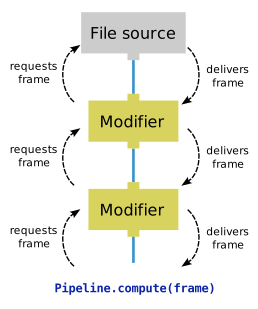
A pipeline processes one trajectory frame at a time: the data argument of modify() holds only the current frame.
Some computations, however, need data from other frames, e.g. to calculate displacements or time averages.
Your modifier can request additional frames from the upstream pipeline through its input slot. The input_slots dictionary contains an entry named "upstream",
which represents the connection to the preceding pipeline stage. Calling its compute() method evaluates the upstream
pipeline at the given frame. The following modifier computes the displacements of particles between the current and the next frame:
class IncrementalDisplacements(ModifierInterface):

    def input_caching_hints(self, frame: int, **kwargs):
        # Ask the pipeline system to keep the current and the next frame in memory.
        return [frame, frame + 1]

    def modify(self, data: DataCollection, *, frame: int, input_slots: dict[str, ModifierInterface.InputSlot], **kwargs):
        upstream = input_slots["upstream"]
        if frame + 1 >= upstream.num_frames:
            return
        next_data = upstream.compute(frame + 1)

        # Map particles of the next frame to the current frame by their unique IDs,
        # and compute displacements using the minimum image convention:
        next_positions = next_data.particles.positions[next_data.particles.remap_indices(data.particles)]
        displacements = data.cell.delta_vector(data.particles.positions, next_positions)
        data.particles_.create_property("Displacement", data=displacements)
Hint
Don’t compute displacements simply as the difference of the position arrays. The storage order of particles may change from frame to frame, and with periodic
boundary conditions, particles leaving the simulation box re-enter on the opposite side. The code above handles both by mapping the particles of the two frames onto
each other using remap_indices() and by applying the minimum image convention using delta_vector().
Input data caching
The input_caching_hints() method in the example above tells the pipeline system ahead of time which frames the modifier will need
to compute a given output frame. The pipeline system then keeps these frames in memory. When the pipeline is evaluated for a sequence of frames, each input
frame gets loaded only once:
pipeline.compute(0)   # Loads input frames 0 and 1
pipeline.compute(1)   # Loads only frame 2; frame 1 is still in the cache
pipeline.compute(2)   # Loads only frame 3; frame 2 is still in the cache
Without caching hints, every evaluation would load both frames from disk again. The method returns a list of frame numbers. If your modifier has
additional input slots, it returns a dictionary specifying the frames for each slot instead,
see input_caching_hints().
Additional input slots
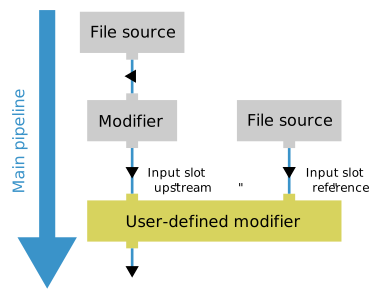
A modifier can receive data from sources other than the upstream pipeline. A typical example is a reference configuration loaded from a separate file,
like the one OVITO’s CalculateDisplacementsModifier can use. To give your modifier an additional input, declare an
OvitoObject trait holding a FileSource. The pipeline system then passes a second input slot, named after the trait,
to the modify() method:
from ovito.pipeline import FileSource
from ovito.traits import OvitoObject

class DisplacementsFromReference(ModifierInterface):

    # A FileSource, which gets its own input slot named "reference":
    reference = OvitoObject(FileSource)

    def modify(self, data: DataCollection, *, input_slots: dict[str, ModifierInterface.InputSlot], **kwargs):
        ref_data = input_slots["reference"].compute(0)
        ref_positions = ref_data.particles.positions[ref_data.particles.remap_indices(data.particles)]
        data.particles_.create_property("Displacement", data=data.cell.delta_vector(ref_positions, data.particles.positions))
In OVITO Pro, the modifier panel displays a file selector for the reference input. In a Python script, you specify the file through the trait:
modifier = DisplacementsFromReference()
modifier.reference.load("input/simulation.0.dump")
pipeline = import_file("input/simulation.100.dump")
pipeline.modifiers.append(modifier)
Caching computation results
The pipeline system calls modify() at least once for every frame. If a modifier computes a quantity that doesn’t depend on
the current frame, e.g. a time average over the entire trajectory, it should compute the value only once and remember it. For this purpose, the pipeline system
passes a data cache to the method, an initially empty DataCollection, which persists across invocations:
class AverageEnergy(ModifierInterface):

    def modify(self, data: DataCollection, *, input_slots: dict[str, ModifierInterface.InputSlot],
               data_cache: DataCollection, **kwargs):
        # Compute the time-averaged mean energy only once, then store it in the cache.
        if "Average Energy" not in data_cache.attributes:
            upstream = input_slots["upstream"]
            total = 0.0
            for frame in range(upstream.num_frames):
                total += numpy.mean(upstream.compute(frame).particles["peatom"])
                yield frame / upstream.num_frames
            data_cache.attributes["Average Energy"] = total / upstream.num_frames

        data.attributes["Average Energy"] = data_cache.attributes["Average Energy"]
You don’t need to manage the lifetime of the cache yourself. The pipeline system clears it automatically whenever the modifier’s input may have changed, e.g. because
the upstream pipeline was modified, and whenever a parameter of the modifier changes. If a parameter doesn’t affect the cached results, you can prevent the cache from
being cleared when it changes by adding the ovito_invalidate_cache=False metadata to the trait (see Parameters of Python extensions).
Changing the trajectory length
By default, a modifier produces as many output frames as the upstream pipeline provides. A modifier can change this number by implementing the
compute_trajectory_length() method. For example, the following modifier passes on only every other frame of the input trajectory:
from ovito.data import DataCollection
from ovito.pipeline import ModifierInterface

class SkipFramesModifier(ModifierInterface):

    def compute_trajectory_length(self, *, input_slots: dict[str, ModifierInterface.InputSlot], **kwargs):
        # Let the output trajectory length be half of the input trajectory length.
        return input_slots['upstream'].num_frames // 2

    def modify(self, data: DataCollection, *, frame: int, input_slots: dict[str, ModifierInterface.InputSlot], **kwargs):
        # Pass only every other frame of the input trajectory down the pipeline.
        data.objects = input_slots['upstream'].compute(frame * 2).objects
If the number of output frames depends on a parameter of the modifier, call notify_trajectory_length_changed() whenever the
parameter changes. See compute_trajectory_length() for an example.