Python extensions
OVITO Pro Python scripts
OVITO lets you add new functionality written in Python. This chapter gives an overview of the available types of Python extensions, explains how to deploy them, and describes the rules your code must follow to work well inside the OVITO Pro desktop application.
Types of extensions
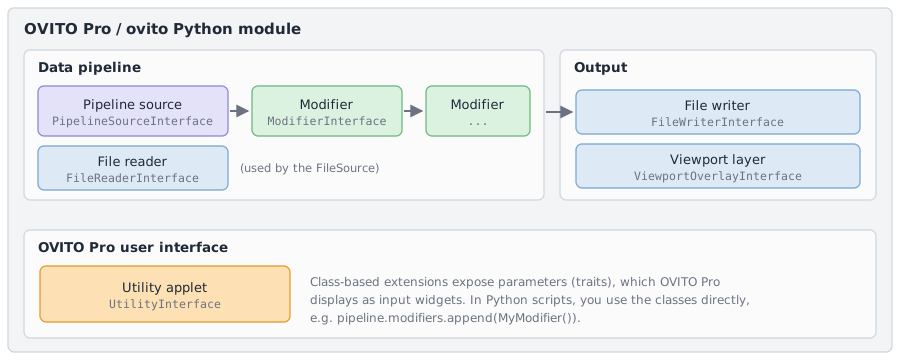
Extension type |
Base class |
Purpose |
|---|---|---|
Analyzes or modifies the data in a pipeline, like OVITO’s built-in modifiers. |
||
Generates the input data of a pipeline, e.g. a synthetic model. |
||
Loads data from a file format OVITO doesn’t support natively. |
||
Writes pipeline results to a custom file format. |
||
Draws text or graphics on top of the rendered scene. |
||
Adds a panel with custom actions to the OVITO Pro user interface. |
You implement an extension by writing a Python class derived from one of these base classes and implementing its abstract methods. The classes are based on the Traits framework, which lets you define adjustable parameters that OVITO Pro displays as input fields in its user interface.
For the two most common types, modifiers and pipeline sources, there is also a simpler, function-based way: you write just a single Python function,
e.g. modify(frame, data) for a modifier. It involves less code, but it offers fewer capabilities than the class-based interface.
Where extensions can be used
The same extension code can be used in three ways:
- In your Python scripts Python scripts
You use an extension like any other OVITO object. For example, you insert an instance of your modifier class into a pipeline with
pipeline.modifiers.append(MyModifier()), or pass your file reader class toimport_file().- Embedded in the OVITO Pro user interface OVITO Pro
OVITO Pro provides a code editor in which you can enter the code of a modifier (Python script modifier), a pipeline source (Python script source), or a viewport layer (Python script layer) directly. The code gets saved along with the session state file. This is the quickest way to develop and test a new extension.
- Installed as a Python package OVITO Pro
You can package the extension and install it in the Python interpreter of OVITO Pro. OVITO Pro then lists the extension alongside its built-in functions, e.g. in the list of available modifiers or file formats. This is the way to make an extension permanently available, and to share it with others; see Packaging and installing extensions.
How OVITO Pro runs your code
When you use an extension in a Python script, your script decides when things happen. Inside the OVITO Pro desktop application, it’s the other way around: OVITO Pro calls your code whenever it needs its results. A modifier function, for example, gets called whenever the pipeline must be re-evaluated – when the user moves the animation time slider, changes a parameter, or when OVITO renders an image. The following sections describe what this means for your code.
Rules for well-behaved extensions
Since you don’t know when and how often OVITO calls your code, it should do only its designated job, e.g. compute the output of a modifier from its input, and have no other side effects. In particular:
Don’t change the pipeline your code is part of, e.g. by inserting or removing modifiers. This can lead to an infinite loop of re-evaluations. To use a built-in modifier as a building block of your own modifier, apply it to the data instead:
def modify(frame, data):
    pipeline.modifiers.append(...)                # DON'T do this
    data.apply(ExpressionSelectionModifier(...))  # but this
Don’t load files or create pipelines within a modifier. A modifier should process just the data it receives. If it needs auxiliary data from a file, give it an additional input slot. To output data to a file, let the user export the pipeline results using a file writer.
Don’t accumulate results in global variables. Your code may be called several times for the same frame, or not at all for some frames. Store results in the data it produces instead, e.g. as a global attribute. A modifier that needs results from several frames should request them from the upstream pipeline explicitly.
Don’t cache references to
ovito.scenein global variables. It refers to the scene of the session currently open in OVITO Pro, which changes when the user loads a different session state file (see The scene in OVITO Pro OVITO Pro).
Code outside of functions
When you enter code in the code editor of OVITO Pro, or when OVITO Pro loads an installed extension package, the top-level statements of your code are executed once. This is the right place for one-time initializations, e.g. importing modules or loading static reference data (see One-time initialization). After that, OVITO calls the functions or methods of your extension as needed.
Output produced with print() appears in the log panel of the extension in OVITO Pro, which is useful for debugging.
Long-running computations
OVITO Pro executes Python code in the main thread of the application, which also processes user input. To keep the user interface responsive during
long-running computations, OVITO Pro periodically interrupts your Python code for a brief moment to process pending events. If the computation becomes obsolete
in the meantime, e.g. because the user has changed a parameter or canceled the operation, OVITO raises a KeyboardInterrupt exception inside your code
to terminate it. Don’t catch and swallow this exception.
Note
The periodic interruption can happen only between Python bytecode instructions. While a single call into compiled code is in progress, e.g. a long NumPy or SciPy operation or a blocking I/O call, the user interface cannot respond and the computation cannot be interrupted. Split long computations into smaller steps to keep the user interface responsive.
To report the progress of a long computation to the user, turn your function into a generator by adding yield statements. Each yield briefly hands control
back to OVITO. Yielding a number between 0 and 1 updates the progress bar; yielding a string displays a status message:
def modify(frame: int, data: DataCollection):
    yield "Computing pairwise distances"
    positions = data.particles.positions
    min_distances = numpy.empty(data.particles.count)
    for i in range(data.particles.count):
        delta = data.cell.delta_vector(positions[i], positions)
        delta[i] = numpy.inf   # Exclude self-distance
        min_distances[i] = numpy.min(numpy.linalg.norm(delta, axis=1))
        yield i / data.particles.count   # Report progress and give OVITO a chance to interrupt
    data.particles_.create_property("Nearest Distance", data=min_distances)
This works for all functions that OVITO calls, e.g. the modify() method of a modifier, the create() method of a pipeline source, or the
action handlers of a utility applet.
Note
Each yield also gives OVITO an opportunity to abort the computation if it has become obsolete. In this case, the yield statement simply never returns
control to your function. Don’t rely on code following a yield to run, e.g. for cleanup; use a with statement or try/finally block instead.
Caution
If a helper function called by your function contains yield statements, call it with a yield from expression, which passes the progress
updates on to OVITO:
def modify(frame, data):
    yield from helper(data)

def helper(data):
    for i in range(100):
        yield i / 100
A yield statement turns helper() into a generator, which does nothing
when called like a normal function.
In a Python script, where no user interface needs to be kept responsive, the yield statements have no effect.