Clusters
Added in version 3.17.0.
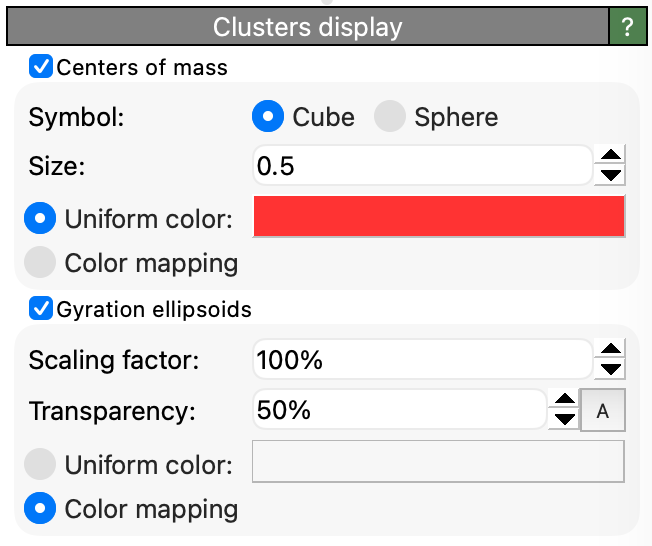
This visual element renders the clusters found by the Cluster analysis modifier. It marks the center of mass of each cluster with a cube or sphere symbol and depicts the spatial extent and shape of each cluster as a semi-transparent ellipsoid derived from the cluster’s gyration tensor.
The visual element is managed by the Cluster analysis modifier and appears under the “Visual elements” section of the pipeline editor whenever the modifier’s Compute centers of mass option is enabled. Rendering the gyration ellipsoids additionally requires the Compute radii of gyration option, which lets the modifier compute the gyration tensor of each cluster.
The three principal semi-axes of a cluster’s ellipsoid are \(a_k = \sqrt{3 \lambda_k}\), where \(\lambda_k\) are the three eigenvalues of the gyration tensor, and the ellipsoid is oriented along the tensor’s principal directions. Since the radius of gyration is given by \(R_g^2 = \lambda_1 + \lambda_2 + \lambda_3\), the root-mean-square of the three semi-axes equals \(R_g\), and an isotropic cluster is depicted as a sphere of radius \(R_g\). Note that the radius of gyration measures the root-mean-square extent of the cluster’s mass distribution, not its outer boundary. An ellipsoid that visually hugs the particles of a cluster is obtained by setting the Scaling factor parameter to \(\sqrt{5/3} \approx 129\%\), which yields the equivalent homogeneous ellipsoid having the same gyration tensor as the cluster. Single-particle clusters, for which the gyration tensor vanishes, are rendered without an ellipsoid.
Parameters
- Centers of mass
Displays a symbol at the center of mass of each cluster.
- Symbol
Selects between cubes (the default) and spheres as symbols marking the centers of mass. Cubes make it easy to tell the centers of mass apart from the particles, which are typically rendered as spheres.
- Size
The display size of the symbols (in simulation units of length), i.e. the radius of the spheres or half the edge length of the cubes.
- Gyration ellipsoids
Displays the gyration ellipsoid of each cluster. This option requires the gyration tensor data computed by the Cluster analysis modifier when its Compute radii of gyration option is turned on.
- Scaling factor
Scales the semi-axes of all ellipsoids by a uniform factor. At the default value of 100%, an isotropic cluster is depicted as a sphere whose radius equals the cluster’s radius of gyration (see above).
- Transparency
The degree of semi-transparency of the ellipsoids.
- Coloring
For the center-of-mass symbols as well as the ellipsoids, you can independently choose between a uniform color and pseudo-coloring based on a property from the generated table of clusters, e.g.
Cluster SizeorRadius of Gyration. When you activate a Color mapping option, OVITO shows a separate panel letting you pick the source property for the pseudo-coloring and configure the color transfer function.
See also
ovito.vis.ClusterVis (Python API)