Measure
Added in version 3.17.0.
This modifier measures the distances, angles and the enclosed area defined by a series of points you pick from the objects in the viewports.
The quickest way to start a measurement is the Measure tool  in the main toolbar
of OVITO. It inserts a new Measure modifier at the end of the selected pipeline and immediately activates the picking
mode, so that you can click on the objects to measure right away. The button stays pressed as long as the picking
mode is active, i.e., as long as clicks in the viewports are recorded as measurement points. Click the button again,
or right-click in a viewport, to finish picking. Every time you activate the tool again, it starts another measurement
with a new modifier instance, while the previous measurements remain in the pipeline.
in the main toolbar
of OVITO. It inserts a new Measure modifier at the end of the selected pipeline and immediately activates the picking
mode, so that you can click on the objects to measure right away. The button stays pressed as long as the picking
mode is active, i.e., as long as clicks in the viewports are recorded as measurement points. Click the button again,
or right-click in a viewport, to finish picking. Every time you activate the tool again, it starts another measurement
with a new modifier instance, while the previous measurements remain in the pipeline.
Alternatively, you can insert the modifier from the Add modification list of the pipeline editor. It is placed above the selected pipeline item and also starts in picking mode.
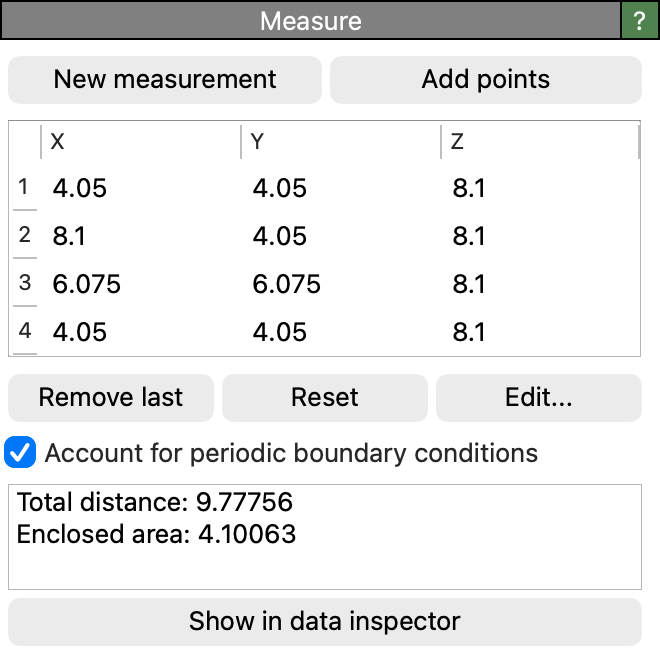
Within the modifier’s panel, click New measurement to start picking. Each click in a viewport adds the object under the mouse cursor to the measurement. Right-click, or click the button again, to stop picking; the points you have collected are kept. Add points resumes picking where you left off and appends further points to the measurement, whereas New measurement discards the current points and starts over. Reset clears the points without entering the picking mode.
The modifier connects the points in the order they were picked and reports the length of every segment, the angle at every vertex where two segments meet, and, if the points return to their starting point, the area they enclose.
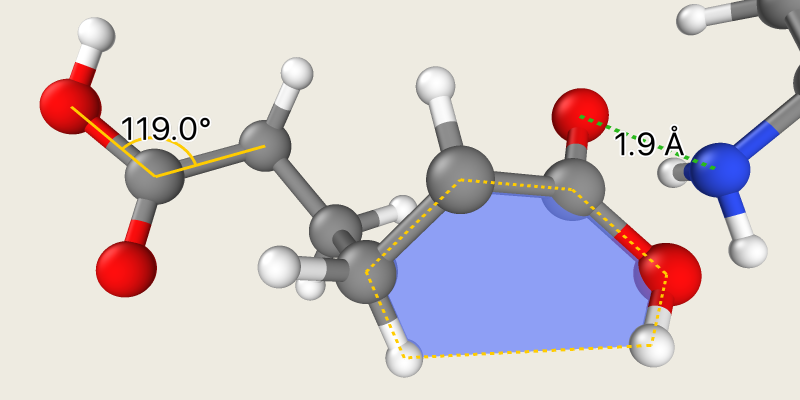
Each kind of object, when picked, contributes the coordinates that represent it best:
A particle contributes its center.
A bond or a line contributes the point on its axis that is closest to the click, not the point on its surface you actually hit.
A dislocation line contributes the closest point on its center line.
A surface mesh or triangle mesh contributes the point on the surface that was clicked.
Every point is added as a separate step, so an accidental click can be taken back with a single undo without losing the rest of the measurement.
Objects of any pipeline in the scene can be picked, so a measurement may span two pipelines - the distance between a particle of one system and a particle of another, for example. The measurement points are stored in the coordinate system of the pipeline the modifier belongs to; a point picked from another pipeline is converted into that system at the moment it is picked and keeps the relative position the two pipelines have at that moment, even if one of them is moved later on.
Tip
One modifier holds a single measurement. To perform several independent measurements, as shown in the image above, insert multiple
instances of the modifier into the pipeline, for example by activating the Measure tool repeatedly. Each instance renders its own measurement and outputs its own
data table and global attributes.
Parameters
- Account for periodic boundary conditions
Connects consecutive points along the shortest path across the periodic boundaries of the simulation cell instead of the direct path between their coordinates (minimum image convention). All distances, angles and the enclosed area are computed from these shortest connections, and the rendered segments follow the same paths: a segment leaving the cell is drawn again where it re-enters on the opposite side. The option is available only if a cell is defined and has periodic boundaries in at least one direction.
Outputs
The modifier outputs the measurement as a single data table (see below) and the aggregate results as global attributes:
Output attribute |
Description |
|---|---|
|
The sum of all segment distances. |
|
The individual segment distances, as a list in path order. |
|
The enclosed area. Only present if the polyline is closed. |
The table can be found in the data inspector. It has one row per point along the path, and every row carries the segment that ends at its point together with the interior angle at that point:
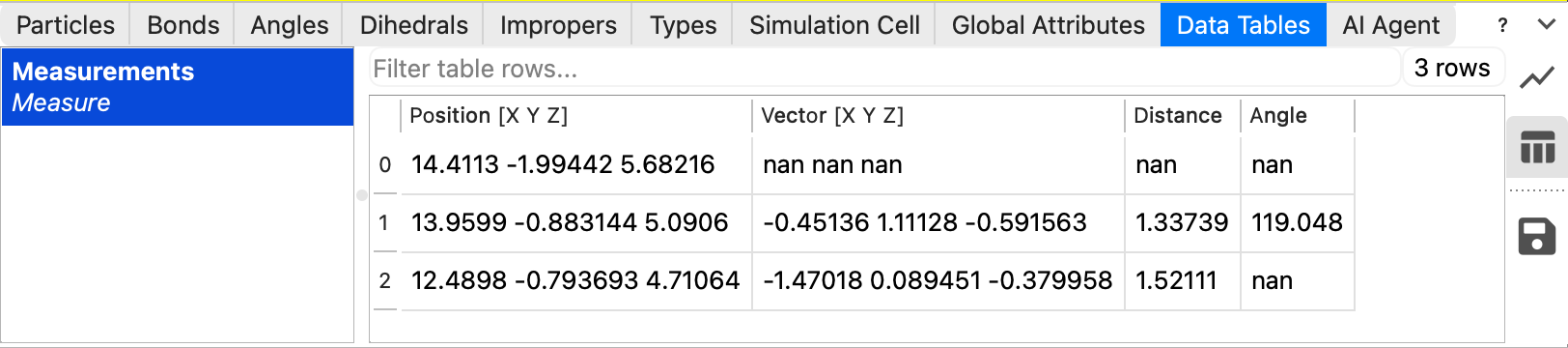
Column |
Description |
|---|---|
|
The coordinates of the point. This is the table’s position property. |
|
The vector of the segment leading to this point from the previous one. |
|
The length of that segment. |
|
The interior angle at this point, in degrees. |
The first row therefore has no segment and no angle, and neither has the last row of an open path; those cells are empty. A closed polyline repeats its first point in a final row, which holds the closing segment and the angle at the start point. Note that a path may visit the same point more than once, which is why the rows follow the path rather than the distinct points.
The measurement is rendered by the Measurements visual element, which takes all the values it draws from this table. Its parameters control the appearance of the annotation.
Note
The area of a closed polyline is computed by projecting it onto its best-fit plane, so a non-planar outline yields the area of that projection. For a self-intersecting outline the contributions of the individual lobes may cancel each other out.
See also
ovito.modifiers.MeasureModifier (Python API)