Introduction
The ovito Python module gives you programmatic access to the data analysis and visualization functions of
OVITO. You can use it to read simulation files, set up data processing pipelines
with OVITO’s analysis modifiers, access and manipulate the computed data with NumPy,
write results to output files, and render images and animations – all from Python code.
This includes the program features that are exclusive to OVITO Pro.
The Python module is free of charge and can be installed in any Python interpreter. It is also built into the OVITO Pro desktop application, which uses it as the mechanism for extending the program with new functions written in Python.
Two ways of using OVITO’s Python API
The Python API serves two quite different purposes, and it helps to know from the start which of the two you are aiming at. They use the same classes and functions, but they differ in who is in control of the program flow.
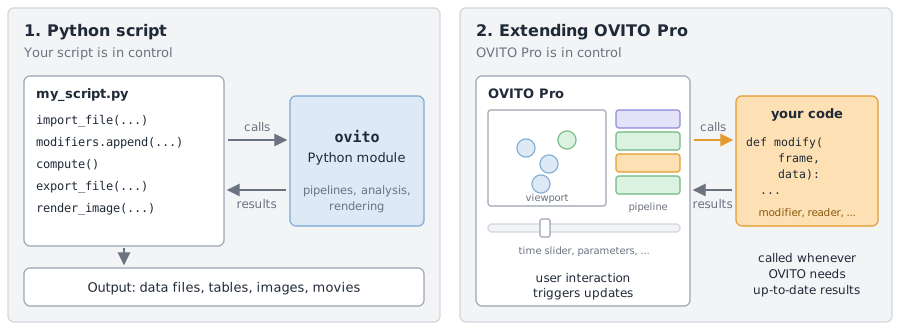
1. Python scripts that use OVITO as a library Python scripts
You write a Python program that loads simulation data, sets up a processing pipeline, and requests the results. Your program is in control: OVITO computes something only when your code asks for it, e.g., by calling
Pipeline.compute(),export_file(), orViewport.render_image(). Such a program runs non-interactively from start to end, which makes it ideal for batch-processing large numbers of simulation files, for analysis workflows on computing clusters, or for interactive data exploration in a Jupyter notebook. Here is an example:from ovito.io import import_file, export_file from ovito.modifiers import CommonNeighborAnalysisModifier, SelectTypeModifier, DeleteSelectedModifier # Load a simulation snapshot. This creates a data pipeline. pipeline = import_file("input/NanocrystallinePd.dump.gz") # Populate the pipeline with modifiers: identify the local crystal structure # of each atom, then remove all atoms that are part of a perfect fcc lattice. pipeline.modifiers.append(CommonNeighborAnalysisModifier()) pipeline.modifiers.append(SelectTypeModifier(property="Structure Type", types={CommonNeighborAnalysisModifier.Type.FCC})) pipeline.modifiers.append(DeleteSelectedModifier()) # Evaluate the pipeline and print the number of remaining atoms. data = pipeline.compute() print("Number of non-fcc atoms:", data.particles.count) # Write the remaining atoms to an output file. export_file(pipeline, "output/defect_atoms.xyz", "xyz", columns=["Particle Identifier", "Structure Type", "Position.X", "Position.Y", "Position.Z"])
2. Python code that extends OVITO Pro OVITO Pro
You write a Python function or class that adds a new capability to the OVITO Pro desktop application – a new type of modifier, file reader, viewport layer, and more. Now OVITO is in control: the program calls your code whenever it needs the result – for example, every time the user moves the animation time slider or changes a parameter in the user interface – and your code is responsible for one well-defined subtask. The following user-defined modifier function computes the mean potential energy of the atoms and outputs it as a new global attribute, which OVITO Pro displays in its data inspector:
import numpy
from ovito.data import DataCollection

def modify(frame: int, data: DataCollection):
    # Look up the per-atom energies and add their mean value to the data as a global attribute.
    energies = data.particles["Potential Energy"]
    data.attributes["Mean energy"] = numpy.mean(energies)
The following table summarizes the key differences between the two scenarios:
Python scripts Python scripts |
Extending OVITO Pro OVITO Pro |
|
|---|---|---|
Who is in control? |
Your script. It runs from top to bottom and calls OVITO’s functions. |
OVITO Pro. It calls your functions as often as needed. |
How is the code run? |
With a Python interpreter ( |
Entered in the OVITO Pro user interface, e.g., in a Python script modifier, or installed as an extension package. |
When are pipelines evaluated? |
Only when your code requests results. |
Automatically, whenever OVITO Pro needs up-to-date results for the viewports or the user interface. |
Where do the results go? |
Nowhere, unless your code writes them to a file or renders an image. |
Into OVITO’s pipeline, where they get displayed and can be processed by subsequent modifiers. |
Typical code structure |
A sequence of statements: |
A function such as |
The two scenarios are not strictly separated. A user-defined modifier written for OVITO Pro is an ordinary Python function or class, which you can insert into a pipeline in a Python script as well. Conversely, OVITO Pro can generate a Python script from a pipeline you have set up interactively in the graphical user interface, giving you a head start for writing an automation script.
Tip
Throughout this manual, the badges Python scripts and OVITO Pro indicate to which scenario a page or section primarily applies.
How this manual is organized
- Getting started
How to install the Python module, followed by a quickstart tutorial that walks you through a complete example script.
- Core concepts
OVITO’s data pipelines, the data model, and how to access and modify data. These concepts apply to both scenarios; please read them first.
- Python scripts Python scripts
Topics specific to writing Python programs: file input and output, rendering images and movies, interactive viewer widgets, session state files, and parallel processing.
- Extending OVITO OVITO Pro
How to write your own modifiers, pipeline sources, file readers and writers, viewport layers, and utility applets, and how to share them with others.
- Code examples
Complete example scripts and extensions that you can use as a starting point for your own work.
The Python module reference, which follows these chapters, documents all classes and functions of the ovito package in detail.
See also
OVITO Extensions Directory – Python extensions for OVITO shared by other users
Python code generator – Converting a pipeline set up in OVITO Pro into a Python script